AI automation systems · for businesses that already have customers

I automate the moments where your business loses leads and hours.

A new enquiry sits for hours before anyone answers. A quote goes out and nobody follows up. Onboarding a client means the same copy-pastes every time. Monday starts with pulling numbers into a report.

I design and build the AI systems that take those jobs, with a person approving every step where judgement matters, and I measure what they release in hours and in cash, never blended into one flattering number.

Former agency CTO · Led a team of 12 developers · 45+ digital projects managed

Fictional exampleHarbor Learning & Coaching · not a real client

SYSTEM Speed-to-lead

TRIGGER
New enquiry: website form or email to the enquiries inbox
STEP 2
Dedupe: same person within 14 days → append, don’t reply twice
CHECKPOINT
Fit unclear, a price question, a complaint or anything about a minor → human queue, owner notified, nothing sent
STEP 7
Hourly sweep, not a 24-hour wait: no booking and no reply 24 h after sending → one follow-up in the same email thread, then stop
STOP RULE
Any reply, “stop”, an unsubscribe, a complaint or a run of errors → automation stops for that lead, owner alerted
HEARTBEAT
Daily status count to the owner; no heartbeat = alarm

Where it leaks

Most businesses don’t need more leads first. They need to stop dropping the ones they have.

When I map a business, the leaks tend to sit in the same four places. None of them is glamorous. All of them happen every week.

  1. The enquiry that waits.

    Someone asks, nobody answers for hours, and by then they’ve booked with whoever replied first.

    Zone 1Speed-to-lead

  2. The follow-up nobody sends.

    Quotes, no-shows, past customers. Everyone means to follow up. It depends on someone remembering.

    Zone 2Follow-up and reactivation

  3. The onboarding done by hand.

    Payment comes in, then the welcome email, the contract, the intake form, the kickoff booking and the shared folder, each one typed out again.

    Zone 3Client onboarding

  4. The report that eats Monday.

    Numbers live in several tools, someone copies them into a sheet, and by the time it’s done nobody has time to act on it.

    Zone 4Reporting

If none of these sound like you, you probably don’t need automation yet. See “not a fit” below: I’ll tell you what I’d do instead.

What I build

Four systems ordered by distance to revenue, and one assistant that can sit on any of them.

I automate closest to the money first: the reply, the follow-up, the booking. Admin comes after. Every system below is a pipeline with a trigger, an AI step where it actually helps, a human checkpoint, a stop rule and a log. The AI writes and classifies. Your rules decide.

  1. Zone 1

    Speed-to-lead

    Every new enquiry answered in your voice, qualified and offered a booking.

    A website form or an email becomes a logged lead, once, even if it arrives twice. AI reads it against your business context, sorts fit and urgency, drafts the reply in your voice and offers your booking link. Anything unclear, price-sensitive or upset goes to a person first. Instagram DMs and text messages can feed the same pipeline, within each platform’s rules.

    Checkpoint Replies are drafted for your approval until they pass the test set we agree on.

  2. Zone 2

    Follow-up and reactivation

    The follow-ups you meant to send, sent on schedule, and stopped the moment someone replies.

    Quotes that went quiet, booked calls that didn’t show, customers who haven’t been back and agreed to hear from you. Each gets a short, written sequence with a clear end. Any reply pauses the sequence and lands with you.

    Checkpoint Nothing offers a discount, a refund or a new date without a person.

  3. Zone 3

    Client onboarding

    Payment in, and the welcome, contract, intake and kickoff happen without anyone copy-pasting.

    The moment a client pays, the system sends the welcome, issues the contract, collects the intake form, books the kickoff and creates the client’s folder from your template. It chases missing items once, then tells you.

    Checkpoint Anything missing or unusual goes to the account owner, not into a loop.

  4. Zone 4

    Reporting

    Your numbers pulled from every tool into one page, with a short brief you read before anyone else.

    Leads, bookings, sales, delivery and cash, pulled on a schedule into one sheet or dashboard. AI writes a short summary with links back to the source numbers, so every sentence can be checked.

    Checkpoint The brief comes to you first. It goes to your team only after you’ve read it.

Zone 5 · a layer on any of them

Agents and assistants

An assistant that knows your business, answers from your documents and knows when to hand over.

Support, sales prep or internal knowledge. It’s grounded in a context pack about your business, tested against real questions before it goes live, and given written rules for what it must escalate. I onboard an agent the way I used to onboard a developer: a clear job, a test, then trust in steps.

Checkpoint Escalation rules are written before the build, and every answer is logged.

Agents, without the hype

An agent is a new hire. I give it a job description, a test and a manager.

Most “AI agents” fail for the same reason a new hire fails: nobody told them how the business works. So every agent I build starts with your company’s context, written down. Then it gets one clear job, a set of real test cases it has to pass, and rules for when it must hand over to a person. It goes live in steps, starting with work a person reviews.

Context pack
What you sell, to whom, how you sound, what you never say, where the source documents live
Job spec
One job, its inputs and outputs, and what “done well” looks like
Test cases
Real questions with the answers you’d accept, run before launch and again after every change
Escalation rules
Written before the build, not discovered in production
A log you can read
Every question, every answer, every handover
Build your context pack yourself with the free Business Brain

The artefact

This is what you get before I build anything: the system, written down.

Every system starts as a one-page recipe you can read in two minutes and argue with. It names the trigger, each step, where AI is used, where a person decides, what stops it and what gets logged. If the recipe is wrong, it’s cheap to fix. If the build is wrong, it isn’t.

The free blueprint is this exact system, built out: every node in n8n and Make, the two prompts, the test leads, the follow-up sweep and the heartbeat.

Get the full Speed-to-Lead blueprint, free

Fictional examplerecipe-speed-to-lead.txt
FICTIONAL EXAMPLE · Harbor Learning & Coaching · not a real client
SYSTEMSpeed-to-lead
TRIGGERNew enquiry: website form or email to the enquiries inbox
STEP 1Idempotency key on email + message → a retried submissionis dropped, never answered twice
STEP 2Dedupe: same person within 14 days → append, don't reply twice
STEP 3Write the lead to the sheet or CRM with source and timestamp,before any AI runs, so a lead can't be lost
STEP 4AI reads the enquiry against the Business Brain: fit, need, urgency
STEP 5AI drafts a reply in Harbor's voice, with the booking link
CHECKPOINTFit unclear, a price question, a complaint or anything abouta minor → human queue, owner notified, nothing sent
STEP 6Clear fit → owner approves the draft on their phone → sent fromHarbor's own mailbox (auto-send only after the agreed tests pass)
STEP 7Hourly sweep, not a 24-hour wait: no booking and no reply 24 hafter sending → one follow-up in the same email thread, then stop
STOP RULEAny reply, "stop", an unsubscribe, a complaint or a run of errors→ automation stops for that lead, owner alerted
LOGEvery run: what came in, what AI decided, what was sent, who approved
HEARTBEATDaily status count to the owner; no heartbeat = alarm
CHANNELSForm and email only in this recipe. If DMs or texts are added:Instagram DMs reply only inside Meta's 24-hour window;SMS only with recorded consent
MEASURETime to first reply · enquiries answered · booking rate→ compared with the baseline taken before launch
OWNERHarbor's account, Harbor's keys, Harbor's data. Nothing on mine.
Fictional example. The timings and rules are design choices for a made-up business, not results. Yours are set with you in the spec.

Human checkpoints

The system proposes. A person decides where it matters.

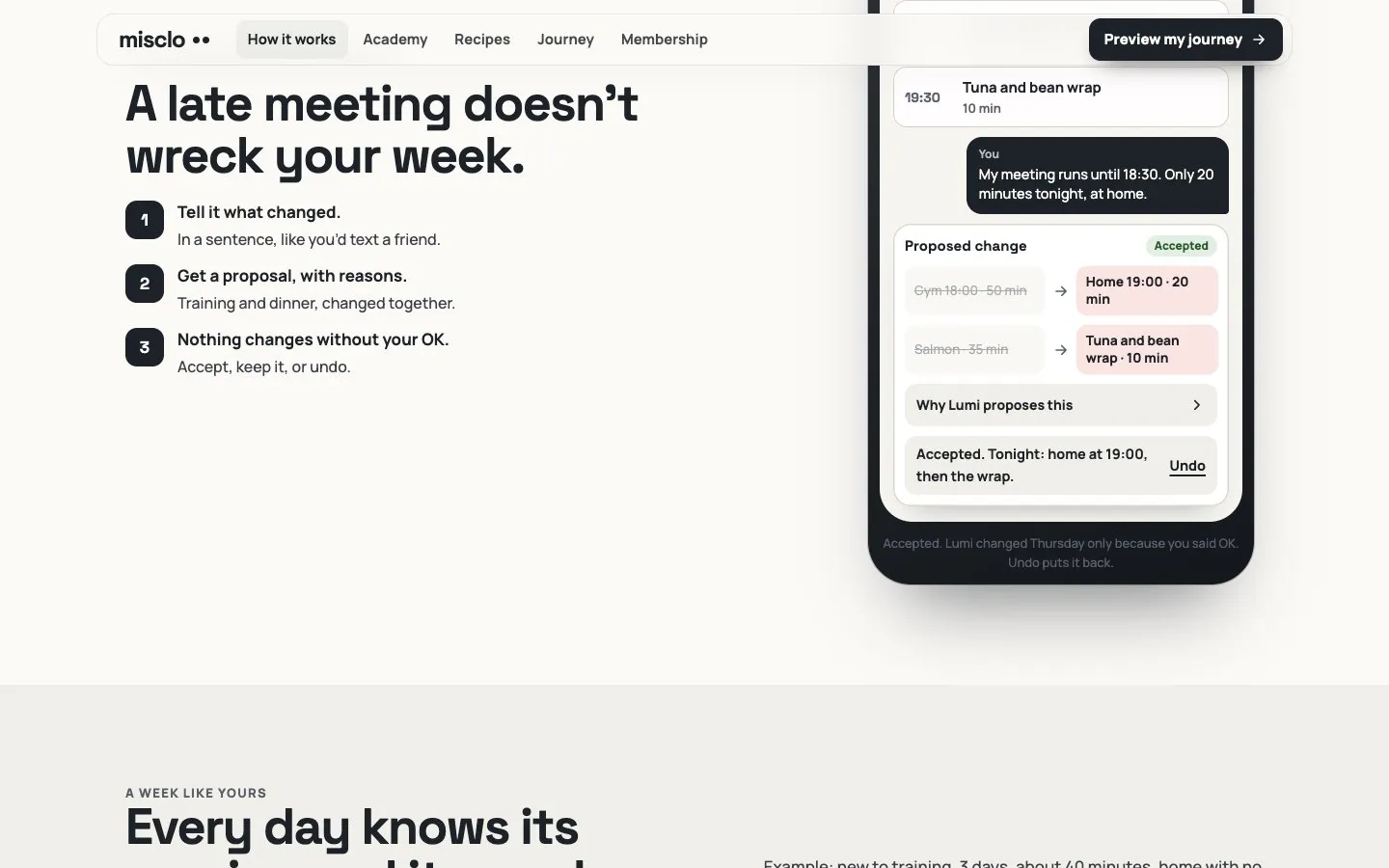
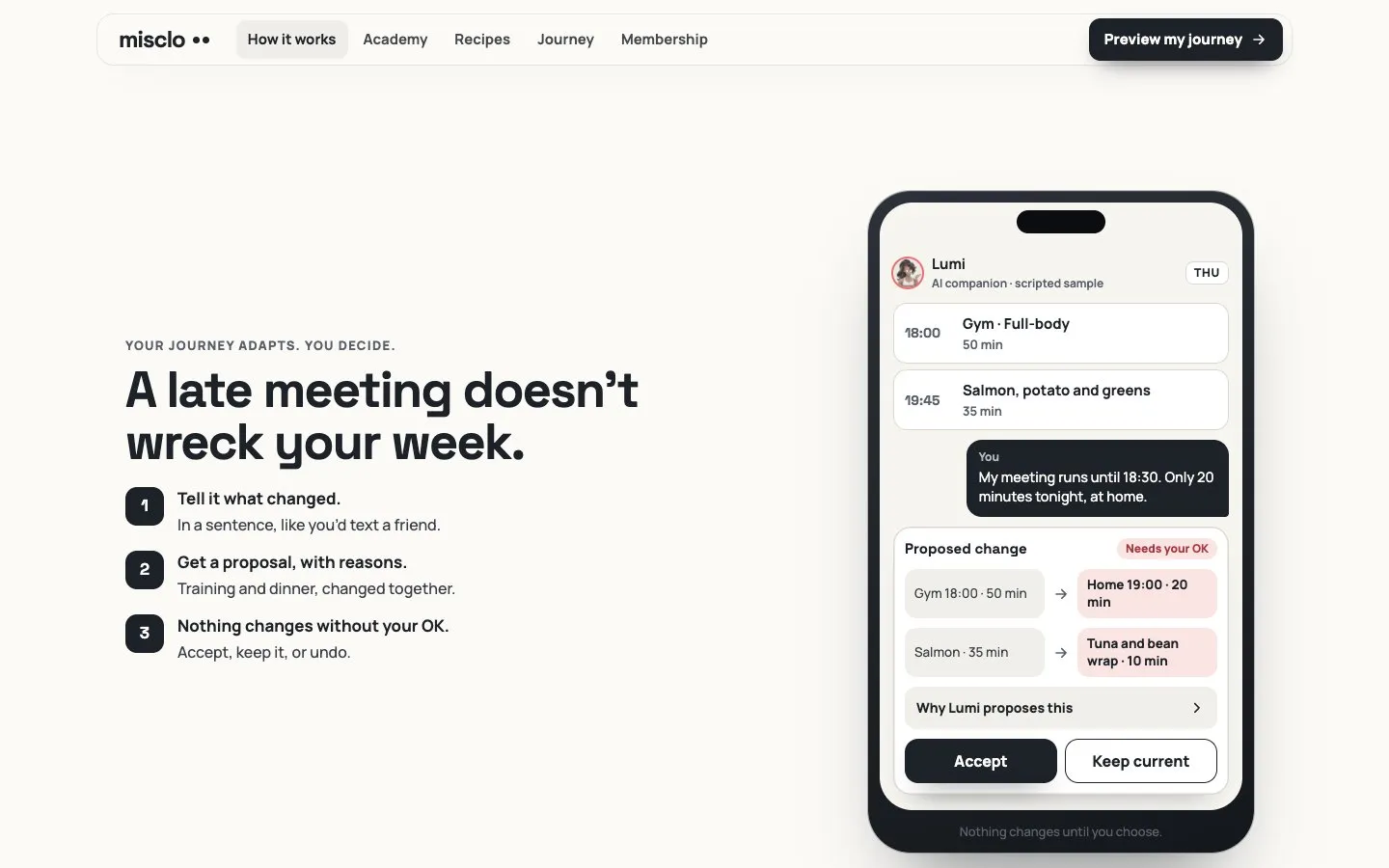
The fastest way to lose a customer’s trust is an automation that confidently says the wrong thing. So before I build, we write down where a person has to stay in the loop. It’s the same pattern I built into Misclo, my own app in development: the system proposes a change, the person accepts it or undoes it, and nothing happens silently.

Proposed: Misclo phone screen: a late meeting leads the AI companion to propose a shorter home workout and a quicker dinner, waiting for the user’s OK. Accepted: The same Misclo screen after the change is accepted, with an Undo link.

Misclo, my own app in development (staging): the system proposes, the person accepts or undoes. Character art is AI-generated.
  • Draft before send. While a system is new, its replies are drafts you approve. It earns the right to send on its own by passing the tests we agreed, case by case.
  • Money and promises go to a person. Prices, discounts, refunds, dates and anything that commits your business are always approved by someone.
  • Sensitive goes to a person. Complaints, health, legal questions, anything involving a minor, anyone who sounds upset.
  • Every system has a stop rule. A reply, an unsubscribe, a complaint or a run of errors pauses it and alerts you. And there’s a plain off switch you control.
  • Customers know when it’s AI. Customer-facing replies say they’re AI-assisted, and in some places, including the EU, that’s a legal requirement.
  • Everything is logged. What came in, what the AI decided, what went out and who approved it, so any message can be traced back.
  • Nothing is bought, sent or published in your name without your OK, during the build and after it.
Animated artwork of Aymane at his desk, smiling at the camera.My animated double (AI-generated)
Aymane Hitmi · Bali · solo with AI

Who builds it

I’ve spent my career connecting systems that businesses depend on.

I’m Aymane Hitmi. I was CTO of a US marketing agency, where I led a team of 12 developers, and as CTO my team delivered and maintained 28+ client platforms. Over my career I’ve managed 45+ digital projects, and I’ve built and shipped two software products of my own. Now I build with AI as my team, in public, and I hold it to the same standard I held people to.

  • Your words kept verbatim in the spec, so the build matches what you asked for
  • Show first, one change at a time. The working version stays live until you approve the next one
  • Tested before shown: every system runs against its test cases before you see it
  • Cost and permission gates: nothing is bought, sent or published without your OK
  • Mistakes written down: if I get something wrong, it goes in the report, not under the rug
See the Lab, with dated builds and their status
  • 45+digital projects managed
  • 12developers in the team I led
  • 2software products I built and shipped
  1. Owner decision
  2. Brief
  3. AI lane
  4. Automated checks
  5. Owner approval
  6. Next versionrollback kept

How we work

Map it, write it, test it, then let it run.

Same discipline I used as CTO of an agency team, now with AI doing the build and me directing, testing and approving. You see each step before it replaces the last.

  1. Map

    We look at how work actually moves through your business and rank the candidates by value, feasibility and risk. We take the baseline numbers now, before anything changes.

    You give
    30–60 minutes and access to your current numbers.
    You get
    A ranked list and the baseline.
  2. Spec

    I write the recipe for each system: trigger, steps, checkpoints, stop rules, logs, tools, running cost and the test cases it must pass. Your words go into the spec verbatim, so nothing drifts.

    You give
    A review and an OK.
    You get
    A fixed scope and the acceptance tests, before any build starts.
  3. Build in test mode

    I build in your accounts, against test data first. Nothing reaches a real customer until it has passed the tests we agreed.

    You give
    Test access.
    You get
    A working system you can try yourself, with the log open.
  4. Launch with checkpoints on

    It goes live with drafts-for-approval and stop rules switched on. We loosen checkpoints only where the log shows it’s earned.

    You give
    A few minutes a day on approvals at first.
    You get
    A live system and a written runbook.
  5. Measure at 30 days

    We compare against the baseline: hours released, cash recovered, running cost. Then we keep it, change it or switch it off.

    You give
    One review call.
    You get
    The numbers, the working, and my honest recommendation.

Measured honestly

Hours released and cash recovered. Two numbers, never added together.

Automation pitches love one big number that blends time saved, revenue “influenced” and a guess about the future. I don’t do that. I measure two things, separately, against a baseline we take before I build anything, and I put what the system costs to run next to both.

  • Hours released How long the task took per month before, minus how long it takes now, including the minutes someone spends reviewing the checkpoints. Released hours aren’t cash, so I report them as hours.
  • Cash recovered Measured as a rate, not a raw total, so a busy month doesn’t flatter the system and a quiet one doesn’t sink it. The sales behind it are listed. If a sale would have happened at the old rate anyway, it doesn’t count.
  • Running cost Software, AI usage and any care plan, per month. Both numbers are shown next to it.
  • The 30-day review We look at the numbers together. If a system doesn’t earn its running cost, I’ll tell you and we switch it off or change it.
See how each number is worked out
BASELINE (before build, from your own records)
  minutes per task × tasks per month ÷ 60          = hours per month now
  enquiries per month · median time to first reply · calls booked
  your close rate (calls → sales) · your average sale

AFTER 30 DAYS
  hours released   = hours before − (hours after + review time)
  booking rate     = calls booked ÷ enquiries   (before vs after)
  extra bookings   = (rate after − rate before) × enquiries after
  cash recovered   = extra bookings × your close rate × average sale,
                     with each sale listed
  running cost     = tools + AI usage + care plan

BASELINE PERIOD
  Same months last year when you have them; otherwise flagged as a
  short baseline. With few enquiries, a difference can be noise, and
  the report says so.

REPORTED AS
  hours released   (in hours, never converted to a dollar "saving")
  cash recovered   (in your currency, with the sales listed)
  running cost     (in your currency)

Work out what the problem costs you today.

Put in your own numbers. The calculator shows what the current way costs you, how many extra sales a month a system would need to cover its running cost out of the profit on those sales, and how long the one-off build fee would take to recover at a number of extra sales you choose. It doesn’t predict an uplift, because I can’t know that before we measure.

Everything is calculated in your browser. Nothing is sent, stored or put in a link. This is arithmetic on your inputs, labelled as an estimate, not a forecast.

Your sales today
The task, in time
Figures to test
Current sales per month—enquiries × today’s rate
Hours a month the task takes now—
What those hours cost at your rate—
covers the running cost above this line
Break-even: extra sales a month that cover the running cost—
Months to recover the build fee, based on your assumption—

I don’t promise hours saved or revenue. I promise the measurement will be honest, and that you’ll see the working.

Investment

Starting prices, in public. Your exact scope comes from a free call.

Every build is a fixed scope with acceptance tests agreed before work starts. Software and AI usage are billed to you directly by the providers, at their prices.

  • Automation

    Single System

    From $850

    One system end to end, such as lead capture → AI qualification → CRM → reply draft → booking.

    • Error handling and logging
    • A human checkpoint
    • A runbook
    • An ROI sheet
  • Automation

    AI Agent / Assistant

    From $1,500

    One grounded assistant for support, sales prep or internal knowledge.

    • Test cases
    • Escalation rules
    • A readable log
  • Automation

    Ops Bundle (3 systems)

    From $2,300

    Three connected systems, typically speed-to-lead, client onboarding and a weekly numbers brief.

    • Three connected systems
    • A Business Brain context pack for your company

After launch: AI Operations Partner

If you’d rather not own the upkeep, I can look after the systems I’ve built: monitoring, fixes, model and API changes, and a monthly report on health and running cost.

Not sure which system comes first?Personal AI Audit & Implementation Roadmap · $970I study your business, rank where AI should go first, and write the first system as a build-ready spec you can hand to me, your team or anyone else.

Final price depends on your tools and how many systems need to connect. It’s fixed in writing before I start.

Stack stance

Your accounts. Your keys. Your data. I choose tools for your business, not for my margin.

I’m not tied to one platform. I pick the tool that fits what you already use and what your team can live with after I leave. Software and AI usage are billed to you by the providers, at their prices. I’ll estimate them in the spec so there are no surprises.

  • Automate
    n8n (cloud or self-hosted), Make, or the native integrations already inside your tools.

    Chosen per business, written into the spec with the reason.

  • Think
    Claude or OpenAI models, through your own accounts and API keys.

    You see the usage and pay the provider directly.

  • Store
    Your CRM, your inbox, your calendar, your sheets.

    I connect to what you have before I suggest anything new.

  • Secrets
    API keys and passwords live in the automation tool’s credential store.

    Never in prompts, documents, spreadsheets or chat.

  • Data
    The AI only sees what a step needs.

    Personal data is trimmed before it reaches a model wherever the job allows.

  • No lock-in
    Everything is built in accounts you own,

    documented so another builder could pick it up, and handed over in full.

Built on myself first

The first automation I’m building is my own: the path from an Instagram comment to this page.

Someone comments a keyword on one of my reels, gets a DM with a link and lands on a free tool, with no email wall. That’s a speed-to-lead system, and it’s mine. I’m building it the way I’d build yours: a written recipe, test mode first, checkpoints, a log, and numbers I’ll only publish once they’re real.

Being built for the launch of this site No results to report yet, and I won’t invent any.

  1. Instagram reelMy AI clone, labelled as AI
  2. CommentA keyword (LEADS, MAP, BRAIN …)
  3. DMOne DM with the link, as a reply to that comment
  4. /free/<tool>/The tool opens, no email wall
    • /challenge/?track=operateSave a seat
    • Cal.comor Book 15 minutes

Free, ungated

Want to build the first one yourself? Take my blueprint.

The Speed-to-Lead blueprint is the recipe I’d use, written so you can build it in n8n or Make: the flow, the qualification prompts and the ROI sheet that keeps hours and cash in separate columns. Pair it with the Ops Map to decide which system to build first.

All three are tools from the OPERATE track of AI Business Build Week, where I build them live next to you for five days, free.

Needs an automation tool: n8n can be self-hosted, and Make has a free plan with usage caps. No keys or passwords live in the files.

  • MAPDay 1

    Ops Map

    The scorecard method that ranks your top three AI opportunities by value, feasibility and risk.

  • BRAINDay 2

    Business Brain

    The context pack every agent and automation should start from.

  • LEADSDay 4

    Speed-to-Lead

    System blueprint, qualification prompts, ROI sheet.

Questions

What people ask before they book.

Will this make me money or save me time?

I don’t promise either. I build systems aimed at the moments closest to your revenue and the tasks that repeat, and I measure what actually changes: hours released and cash recovered, separately, against a baseline taken before the build. If a system doesn’t earn its running cost, I’ll say so.

Do I need to know n8n, Make or code?

No. I build it, document it and walk you through the runbook. If you want to own the upkeep yourself, I’ll show you how. If not, a monthly care plan covers it.

Who owns what you build?

You do. It’s built in your accounts, with your API keys, on your data. You get the recipe, the runbook and full access. Another builder could pick it up without me.

Where does my customers’ data go?

It stays in your tools. The AI only sees what each step needs, and personal data is trimmed before it reaches a model wherever the job allows. I use API accounts, which by default aren’t used to train models, and I’ll note the provider’s retention settings and data processing terms in the spec. If your data needs to stay in the EU, I check which providers and regions can do that before I choose the tools. I’m not a lawyer: if your industry has specific rules, we build to what your adviser tells us.

Will the AI talk to my customers without me?

Only after it has earned it. New systems draft replies for your approval, and anything involving money, promises, complaints or sensitive topics always goes to a person. Customer-facing replies say they’re AI-assisted, and in some places, including the EU, that’s a legal requirement.

What happens when something breaks?

Every system logs each run and alerts you when it errors or hits a stop rule, and the runbook says what to do. If you’re on a Partner plan, I fix it.

How long does a build take?

It depends on how many tools have to talk to each other and how clean your current data is. The spec names the timeline before you pay, and I won’t quote one before I’ve seen your setup.

Can you work with the CRM and tools I already have?

Usually, yes. I start with what you already use. If a tool can’t be connected safely or reliably, I’ll tell you on the call and suggest the smallest change that fixes it.

Can I start smaller?

Yes. Take the free Speed-to-Lead blueprint and build the first system yourself. Or book the 15-minute call and I’ll tell you the one system I’d build first, even if the answer is “build it yourself”.

Why work with one person instead of an automation agency?

You talk to the person who designs and builds the system, not an account manager. I ran an agency’s engineering team, so I know the process an agency uses. I just run it with AI, and I show you every step.

Your move

Build the first one yourself, or have me build it with you.

Have it built

Book 15 minutes with me

Fifteen minutes with me. Tell me what you sell, where enquiries come in and which tools you use. You’ll leave knowing the first system I’d build in your business, or that you don’t need one yet.

The call ends in one of four answers: do it yourself with my free tools, the audit, a direct build proposal, or an honest “not a fit”.

Rather learn it live? AI Business Build Week, OPERATE track

Prefer email? contact@labgenz.com