Free library · ungated · no email

Take the tools. Keep what they make.

Each tool here ends in something you keep: a scored offer, a Business Brain your AI reads before it writes a word, a ranked map of where AI pays off in your business, a content system that sounds like you.

I build them the way I ran client projects as an agency CTO: a brief, a method, checks before anything ships, and a worked example (fictional, and labelled as such) so you see what good looks like before you start.

Start here

Pick the sentence that sounds like you.

The tools are arranged by the days of AI Business Build Week. Use them in order and each one feeds the next: Day 1 tells you what to work on, Day 2 gives your AI the context, Day 3 puts it in front of people, Day 4 automates the money moment. The Blueprint is the Day 0 map for the whole week.

LAUNCH

I’m starting a business with AI

  1. BLUEPRINT
  2. OFFER
  3. BRAIN
  4. CONTENT
OPERATE

I already run a business

  1. MAP
  2. BRAIN
  3. CONTENT
  4. LEADS

Your choice only filters this page. Nothing is saved or sent.

The library

Six tools. Something you keep from the first sitting.

Filter by track, or read them in challenge order. Every card tells you what you’ll have at the end, what it takes, what it costs and how long the first result takes. Open any of them: no account, no email, no “part two” behind a form.

Show

Sorted by challenge day. Day 0 is setup. Tools marked “Both tracks” appear under both filters.

  • BLUEPRINTDay 0 · Setup

    The Solo Builder Blueprint

    Turn one observed problem into a tested offer, an AI team that works from your brief, and a first-sale system you run alone, stage by stage.

    Track
    LAUNCH
    Day
    Day 0
    First result
    45 min

    Format: Guide + PROJECT.md worksheet + fictional worked example (Markdown, 11-prompt chain with OS-REPORT loop)

    Free AI plan works. No coding required. The optional Stage 4 automation has its own costs, listed in the guide.

    What it costs
    • Blueprint: free, no email required
    • AI assistant: free tier on Claude or ChatGPT; individual paid plans around US$20/month at list price (verify on the vendor's pricing page)
    • Google Sheets: free
    • Booking link: Cal.com free plan or the tool you already use
    • Payments: test mode costs nothing; fees apply only to live payments (check your country is supported)
    • One-page site: free tiers exist on several builders and static hosts; custom domain optional
    • Automation tool (optional, Stage 4): free plans with usage caps (Make, Zapier) or self-hosted n8n
    • Automating the AI reply-draft step (optional, Stage 4): needs API access or the automation tool's AI credits, billed separately from your Claude/ChatGPT plan; the default no-code path pastes drafts into your chat instead (check current pricing)
    Last reviewed 9 Nov 2026 · written for current Claude and ChatGPT models
  • OFFERDay 1

    Offer Lab

    Turn real buyer complaints into one scored, priced offer you can test with ten real people this week.

    Track
    LAUNCH
    Day
    Day 1
    First result
    90 min

    Format: Prompt chain (7 prompts) + scoring sheet (CSV) + Offer Card template

    Bring 10–20 pieces of real buyer language. Free AI plan works.

    What it costs
    • AI chat: free tiers can run the chain; paid plans are about $20/month in the US for Claude or ChatGPT at the time of writing (check your local price)
    • Google Sheets: free with a Google account
    • Evidence sources: free to read; respect each site's terms
    • Time: 30-60 min collecting evidence, about 75 min running the chain (incl. a 10-min check of existing alternatives), then 10 conversations; 1.5-2.5 hours before the first conversation
    Last reviewed 9 Nov 2026 · written for current Claude and ChatGPT models
  • MAPDay 1

    AI Ops Map & Opportunity Scorecard

    Find where AI pays off in your business, and where it doesn't: every recurring workflow priced, scored and ranked, with an honest return.

    Track
    OPERATE
    Day
    Day 1
    First result
    45 min

    Format: Method page + 2 prompts (interview with scoring-facts check, scoring with sceptic pass) + 34-column CSV scorecard

    Includes a “no AI needed” list. That list is part of the point. Free AI plan works; no automation tool needed.

    What it costs
    • This tool: free, no email required
    • Claude or ChatGPT: free tiers can work for short pastes; Claude Pro or ChatGPT Plus were around 20 USD a month at the time of writing; check your local price
    • Google Sheets: free with a Google account, or the spreadsheet you already have
    • No automation tool needed for this tool
    Last reviewed 9 Nov 2026 · written for current Claude and ChatGPT models

  • BRAINDay 2

    The Business Brain

    Answer 25 questions once and get one context file, plus exports for Claude and ChatGPT, that make them write from your offer, clients, voice and rules.

    Track
    Both tracks
    Day
    Day 2
    First result
    40 min

    Format: Claude skill (SKILL.md, also as a ready-made ZIP) + context-pack template + exports

    Installing the skill needs a Claude plan with Skills and code execution (paid at the time of writing). The paste-in version works on any plan.

    What it costs
    • This tool: free, no email required
    • Your AI provider's plan if you choose a paid one (Claude Pro or ChatGPT Plus were around 20 US dollars a month at the time of writing; check current pricing)
    • No other tools, API keys or subscriptions needed
    Last reviewed 9 Nov 2026 · written for current Claude and ChatGPT models
  • CONTENTDay 3

    Content Engine

    Turn 10 of your past posts into a voice guide, four pillars, a hook bank, a 30-day calendar with 10 drafts and a keyword DM funnel you run in one weekly batch.

    Track
    Both tracks
    Day
    Day 3
    First result
    30 min

    Format: Claude skill + method guide + content calendar (CSV)

    AI drafts. You decide what goes out. Includes how to disclose an AI version of yourself. Free AI plan works for a first pass; the DM funnel uses ManyChat, which has a free plan with limits.

    What it costs
    • Claude or ChatGPT: free tier works for a first pass; paid individual plans around $20/month (Skills need a Claude plan with Skills enabled)
    • Google Sheets: free
    • Instagram professional account: free
    • ManyChat: free plan with limits; paid plans priced by contacts, from around $15/month at the time of writing
    • Recording and editing (phone camera, CapCut or similar): free tiers available
    • AI avatar and voice tool: optional, vendor pricing varies
    Last reviewed 9 Nov 2026 · written for current Claude and ChatGPT models
  • LEADSDay 4

    Speed-to-Lead System

    Every enquiry qualified against your ideal client the moment it arrives, with a reply draft waiting for your approval and a 24-hour follow-up that never fires twice.

    Track
    OPERATE
    Day
    Day 4
    First result
    40 min

    Format: System blueprint (n8n and Make build guide, Day 4 minimum path) + 4 prompts (2 run in production) + JSON Schema (full and provider copy) + 8 test leads + ROI sheet

    Needs an automation tool (n8n or Make) and a pay-as-you-go AI API account with a spending limit. No keys or passwords live in the files.

    What it costs
    • n8n: cloud plan billed by executions, or self-host on your own server; check current plan limits
    • Make: free tier with an operations limit, paid tiers above it; scheduled checks use operations even when idle
    • AI API: pay per token; work out your own cost per 100 leads with the method in this pack
    • Google Sheets, Gmail or Outlook, and a form tool: free tiers are enough for test mode
    • Your time: about 40 minutes for the Day 4 minimum flow, one to two more sessions for the full flow, then weekly review; tracked as hours in the ROI sheet, never as cash
    Last reviewed 9 Nov 2026 · written for current Claude and ChatGPT models

Why is this free?

Fair question. Here’s the whole answer.

These tools are how I show you how I work, instead of telling you. You can judge my method by running it on your own business before you ever talk to me. That’s a better test than anything I could write about myself.

They’re also the tools of AI Business Build Week, my free five-day live challenge. Using them alone works. Using them live, with me building the same deliverable next to you, works better.

And some people will want it done for them. That’s how Labgenz earns: the Personal AI Audit & Implementation Roadmap ($970), and fixed-scope builds. If that’s never you, the tools are still yours.

When I ran delivery for an agency, nothing went to a client without a brief, acceptance checks and someone whose job was to break it. I hold these tools to the same bar, so open any of them and you’ll find the same parts.

Aymane

The deal

  • No email wall, no account, no “unlock the full version”. What you see on the page is the whole tool.
  • What you may pay for is what you run them on. Most tools work on a free Claude or ChatGPT plan. Every card lists every cost, including the ones that aren’t free: a paid Claude plan to install a skill, and for Speed-to-Lead an automation tool plus a pay-per-use AI API.
  • Every tool carries a “last reviewed” date and the models it was written for. Models change, so I re-check them.
  • Every worked example is fictional and says so. I don’t have client results to show you for these tools yet, and I won’t invent them.
  • Nothing here promises income, clients or hours saved. A tool gives you an artefact. What it’s worth depends on what you do with it.

AI Business Build Week · free · live

One tool gets you a file. Five days get you the whole system.

Each tool in this library is one day of my free five-day live challenge. Every day there’s one live hour on Google Meet: I teach one principle, build the day’s deliverable on screen for both tracks, take a hot seat or two, and set homework of 40 minutes or less. Submit all five and you’re invited to the Day 6 clinic.

  1. 0Setup

    Set up the desk

    LAUNCH
    Build Desk: folder, tracker, brief, account plan
    OPERATE
    Build Desk, plus a tool inventory and last month’s numbers
  2. 1Day 1

    Decide where the money is

    LAUNCH
    Your Offer Card
    OPERATE
    Your Ops Map and top three AI opportunities
  3. 2Day 2

    Build your AI team

    LAUNCH
    Business Brain v1 and a four-role AI team
    OPERATE
    Company Context Pack and your first agent spec
  4. 3Day 3

    Make the thing people see

    LAUNCH
    A live offer page and lead magnet
    OPERATE
    Content Engine v1
  5. 4Day 4

    Automate the money moments

    LAUNCH
    A first-sale system working end to end in test mode, plus 25 researched prospects
    OPERATE
    Speed-to-lead running in test mode and a back-office automation spec, with an ROI sheet
  6. 5Day 5

    Run it like an operator

    Live only
    LAUNCH
    A 30-day launch plan and a solo operating routine
    OPERATE
    An AI dashboard, an AI policy and a 90-day roadmap

Dates are announced here first, once the registration system is live.

Deliverables are what you’ll work on each day, drafted to v1. How far you take them is up to you.

Rather have it running in your business?

15 minutes with me. You’ll leave knowing the next step, even if it’s a free one.

Tell me what you sell and where work or leads slip. I’ll come prepared and tell you straight which of four things makes sense: use the free tools yourself, the Audit ($970), a direct build proposal when the brief is already clear, or that we’re not a fit.

  • Personal AI Audit & Implementation Roadmap: $970. One business, a ranked plan, your first build specified.
  • Builds start at $850 for a single automation; an immersive 3D flagship site starts at $3,200. Fixed scope, confirmed after the call.
See the Audit · $970

No slides, no pitch. If the free tools are enough, I’ll say so.

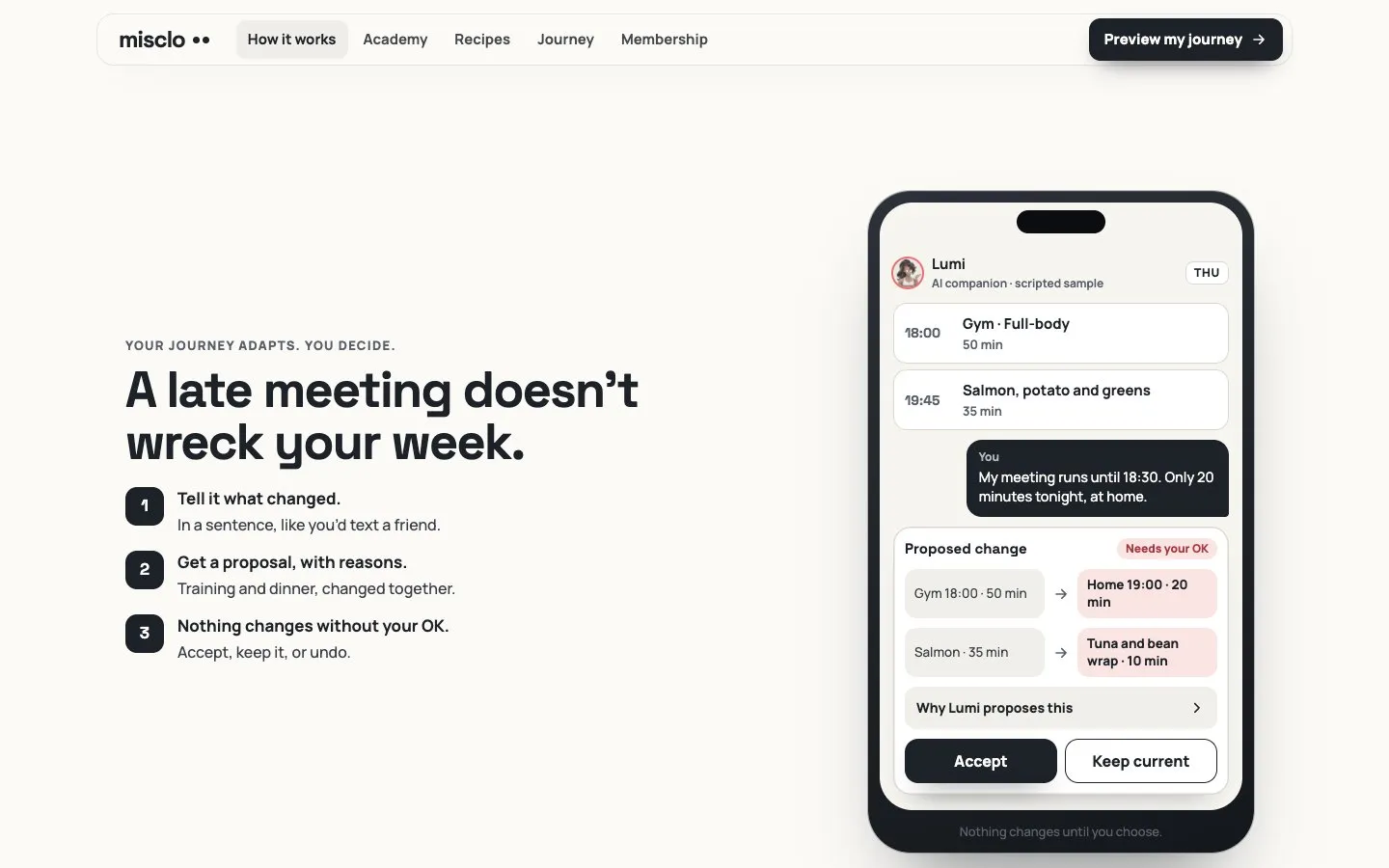
ProposedMisclo phone screen: a late meeting leads the AI companion to propose a shorter home workout and a quicker dinner, waiting for the user’s OK.
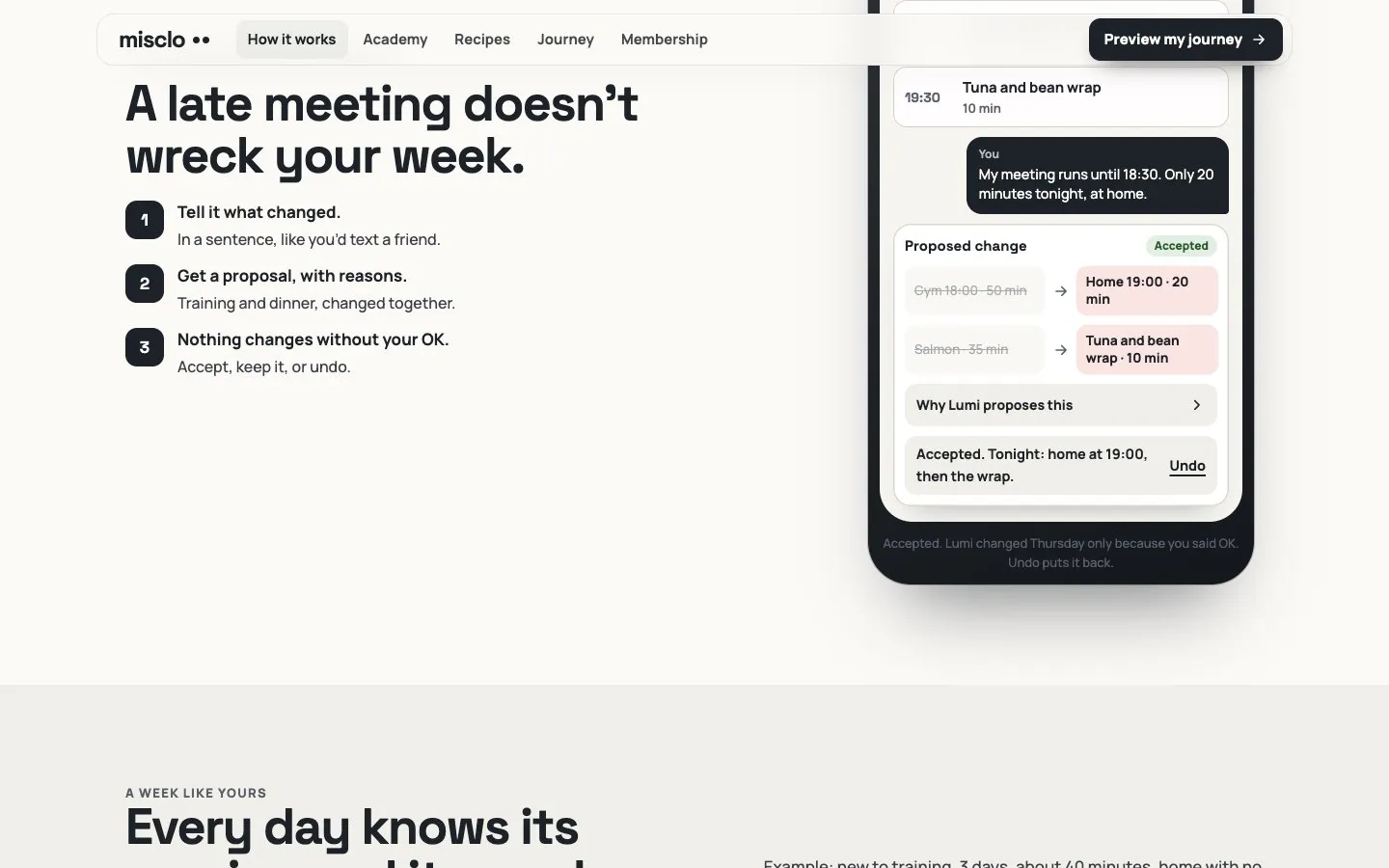
AcceptedThe same Misclo screen after the change is accepted, with an Undo link.
From Misclo, my own app in development: a proposed change waiting for the user’s OK, then accepted with Undo. Scripted sample.
Animated artwork of Aymane at his desk, smiling at the camera.My animated double (AI-generated)
Aymane Hitmi · Labgenz

Who’s behind this

I’m Aymane. I used to build with a team. Now I build with AI.

I’ve managed 45+ digital projects. I was CTO of a US marketing agency, where I led a team of 12 developers. Today I work solo, with AI as my team, and I build in public from Bali.

Right now that means Misclo, my own app in development (launch set for 1 January 2027), and Theo, a 3D character I built from a Tripo AI mesh and rigged and animated in Blender with AI-written tools. Every tool in this library uses the same habits those builds run on: the owner’s words kept verbatim, one change at a time, checks before anything is shown, and a rollback kept until I approve the new version.

  • 45+digital projects managed
  • 12developers in the team I led

The face on the Labgenz Instagram reels is an AI version of me, and it’s always labelled. Read how I use it

Questions

Before you open one.

Do I need to pay for anything?

Not for the tools themselves: no fee, no email, no account. What you run them on can cost money, and every card lists it. Most tools work on the free tiers of Claude or ChatGPT. Installing a Claude skill needs a plan with Skills and code execution, which was a paid plan at the time of writing; the paste-in version works on any plan. Speed-to-Lead also uses a paid AI API, billed per use, and the tool shows you how to work out your own cost per 100 leads. It needs an automation tool too: Make has a free plan with an operations limit, n8n cloud is billed by executions, and self-hosted n8n needs a server.

Do I need to code?

No, except where a tool says otherwise. The Blueprint has a no-code path at every stage. Speed-to-Lead asks you to set up an automation in a visual tool, step by step.

What happens to what I type?

The keyword field runs in your browser. This page doesn’t send your answers anywhere, doesn’t make AI calls and never puts what you type into a link. When you paste things into Claude or ChatGPT, that provider’s terms apply, so every tool tells you what to remove first: names, keys, passwords and customer data.

Will these get me clients or revenue?

I don’t promise that, and you should be wary of anyone who does. Each tool gets you a specific artefact, built properly. The Offer Lab, for example, is designed so ten real conversations can reject a weak offer before you build it.

Are the examples real?

The worked examples are fictional, and each one says so. When I show my own work, it’s my own projects, and I say what state they’re in.

Which tool should I start with?

Starting a business: the Blueprint, then Offer Lab. Running one: the Ops Map. Both: the Business Brain, because every other tool gets better once your AI knows your business.

Why does the Instagram account look like you?

It’s an AI version of me, and every reel is labelled as AI-generated. The person who writes these tools and runs the challenge is me. Details on the AI disclosure page.

Your next step

Open a tool tonight. Build the rest with me live.

Start with the tool that matches the sentence you picked at the top. When you want the whole system, the challenge is free. When you want it built, the call is free too.

AI Business Build Week · free · live

One tool gets you a file. Five days get you the whole system.

Open the free blueprint

Rather have it running in your business?

15 minutes with me. You’ll leave knowing the next step, even if it’s a free one.

Questions first? Write to contact@labgenz.com.